 Kara
Kara
-
Download the installer
Choose the CPU edition for any PC, or the NVIDIA edition for a compatible NVIDIA card with a current driver. Both work on Windows 10 and Windows 11, 64-bit, and neither needs Python or a CUDA Toolkit.
-
Windows will try to stop you. This is expected.
When you open the file, Windows shows a blue box. It says it protected your PC and offers only one button: Don't run.
Windows protected your PC
Microsoft Defender SmartScreen prevented an unrecognized app from starting. Running this app might put your PC at risk.
Don't runAn illustration of the dialog, not a photograph of one. The wording on your screen may differ slightly by Windows version. Click the small More info link. A second button appears — Run anyway — and that is the one you want.
Windows protected your PC
Microsoft Defender SmartScreen prevented an unrecognized app from starting. Running this app might put your PC at risk.
Run anyway Don't runAfter clicking More info. Press Run anyway. Why does this happen?
SmartScreen is not saying the app is dangerous. It is saying it does not recognise who made it. Windows recognises a publisher when the program is signed with a code signing certificate, which costs a few hundred dollars every year. Kara is free and has no income, so it is not signed, and every unsigned program gets this box — a brand new one especially, before enough people have installed it.
That also means the warning is not proof of anything either way. So do not take this page's word for it — check the file yourself.
Checking the file, if you want to. Every release publishes the fingerprint of the exact file it shipped. Open Terminal and run this:
Get-FileHash "$HOME\Downloads\Kara-Setup-0.3.4.exe" -Algorithm SHA256
Compare what it prints against SHA256SUMS.txt on the release page. If the two match, the file on your disk is byte for byte the one that was published. If they do not match, delete it and download again.
-
Run the installer
Kara installs for you only, inside your own user folder, so Windows never asks for an administrator password. Click through and the defaults are fine.
Select Additional Tasks
Which additional tasks should be performed?
Start Kara when Windows startsCreate a desktop iconDestination folder
C:\Users\you\AppData\Local\Programs\KaraBack Next CancelAn illustration of the setup wizard. Leaving Start Kara when Windows starts ticked means it is always there when you need it. When it finishes, Kara is in your Start menu. If you ever want it gone, it uninstalls from Settings → Apps like anything else.
-
The first time you open it, wait for the model
Kara does the speech recognition on your own computer, which means the speech model has to live on your disk. The first launch downloads it — about 460 MB, once. It needs the internet for this and only this.
Downloading the speech model
285 MB of 460 MB · this happens only once
An illustration of the first-run download. On a normal connection it takes a few minutes. After this, unplug the internet if you like. Nothing you say is ever sent anywhere. There is no account, no server, and no telemetry — the recognition runs entirely on your machine.
-
Hold Insert and talk
That is the whole thing. Hold the Insert key, say your sentence, let go. A moment later the words are typed wherever your cursor was — your browser, Word, a chat box, anywhere.
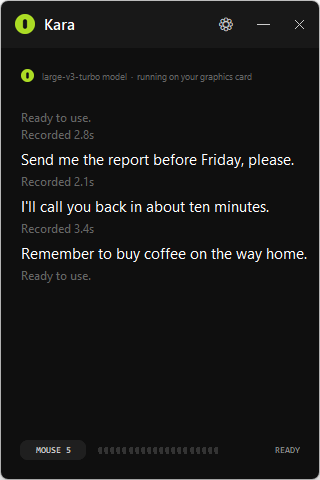
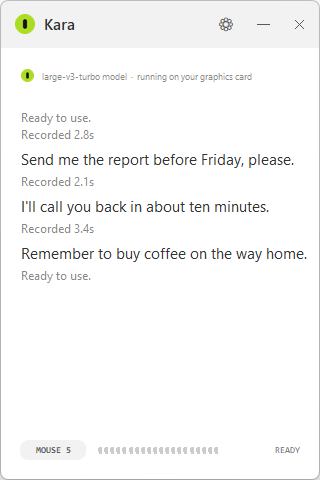
The real window. It hides near the clock — click that icon to bring it back. Do not like Insert? Click the ⚙ button to pick a different key, a mouse button, your microphone, or the language you speak.
If something goes wrong
The three things that actually go wrong
The blue box has no "Run anyway" button
You have to click More info first — it is small grey text above the button, easy to miss. If there is still no such button, your PC has Smart App Control switched on, which is stricter than SmartScreen and blocks all unsigned software outright. It can only be turned off, never back on, so think about it before you do: open Windows Security → App & browser control → Smart App Control settings.
My antivirus deleted the file
Some antivirus products flag any unsigned installer, and PyInstaller programs like this one get flagged more than most because malware authors use the same packer. Check the SHA256 as described in step two. If it matches the published one, the file is the one that was built in public from source, and you can restore it from your antivirus' quarantine and add an exclusion.
It types nothing when I let go
Give the model a moment on the first sentence — it loads into memory the first time and is quick after that. If nothing appears at all, open the settings with ⚙ and check the microphone: if auto picked the wrong one, choose yours from the list.
Still stuck? Open an issue on GitHub and describe what happened.